Ordered processing steps
Combine resize, crop, rotation, color, sharpen, blur, watermark, compression, and AI steps in a deliberate order.
 Image Batchfor Windows 10/11 · x64
Desktop batch image software
Batch image software for repeatable folder-based work. Arrange your processing steps, preview a representative result, and export locally. Add offline AI when your hardware supports it.
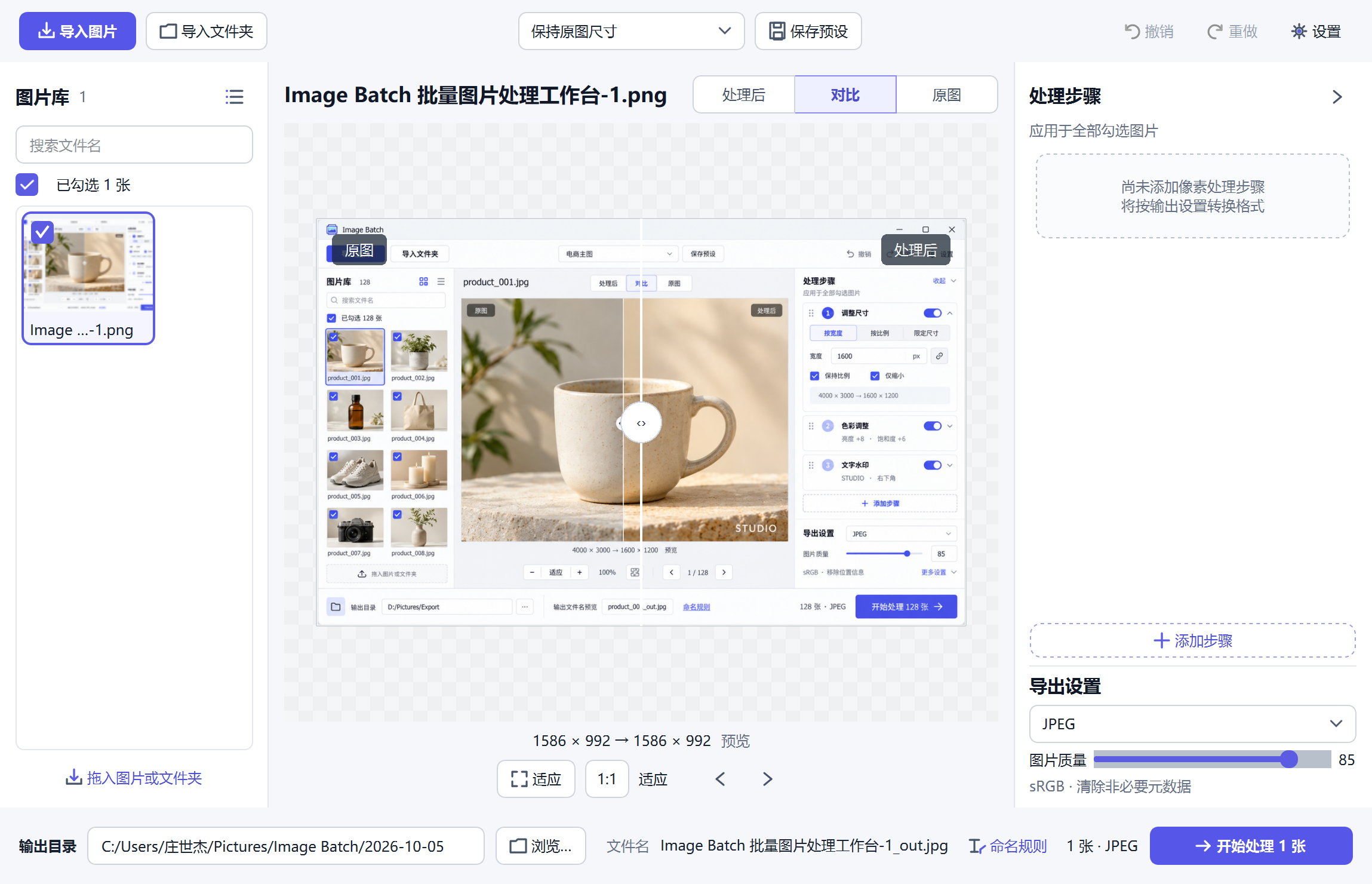 Real Image Batch V10 interface
Built for real queues
Combine resize, crop, rotation, color, sharpen, blur, watermark, compression, and AI steps in a deliberate order.
Output plans are frozen before a task starts, source overwrites are blocked, and temporary files are committed safely.
Remove backgrounds with MODNet or U²-Net and upscale with Real-ESRGAN. No uploaded images or remote inference API.
Batch image processing software
A desktop workspace for combining routine edits, saving consistent settings, and keeping processing on your own machine.
Add images through file selection, folder import, or drag and drop. Deduplication, search, a thumbnail library, and an independent preview help you inspect the queue before processing.
Resize with free or fixed ratios, draw rectangle, circle, or ellipse crops, and rotate or flip your photos. Create a consistent product grid or a set of correctly sized publishing assets.
Combine brightness and color changes, grayscale, inversion, sharpening, and blur. Inspect a representative preview before applying the treatment across your image queue.
Build a reusable branding step with text or a local logo. Combine it with earlier edits so the watermark is applied as part of the same export workflow.
Choose JPEG or WebP quality, or search for an actual target KB size through encoding. Output size depends on the source detail and dimensions; a requested limit is not a universal quality guarantee.
Export JPEG, PNG, WebP, TIFF, or BMP using the format controls available in the desktop build. Use naming templates and conflict handling to keep outputs organized.
Add, remove, enable, and reorder processing steps. Undo and redo make configuration changes easier to review. Built-in starting points cover original-size, web, social, and ecommerce workflows.
Each task uses a snapshot of its settings and output plan. Source overwrites are blocked; temporary outputs are committed after writing. Keep originals and review your destination before starting.
Follow actual file progress, pause new work from being dispatched, or cancel cooperatively. Partial failures do not stop every other file. Configure output folders, cache, threads, and memory settings for your machine.
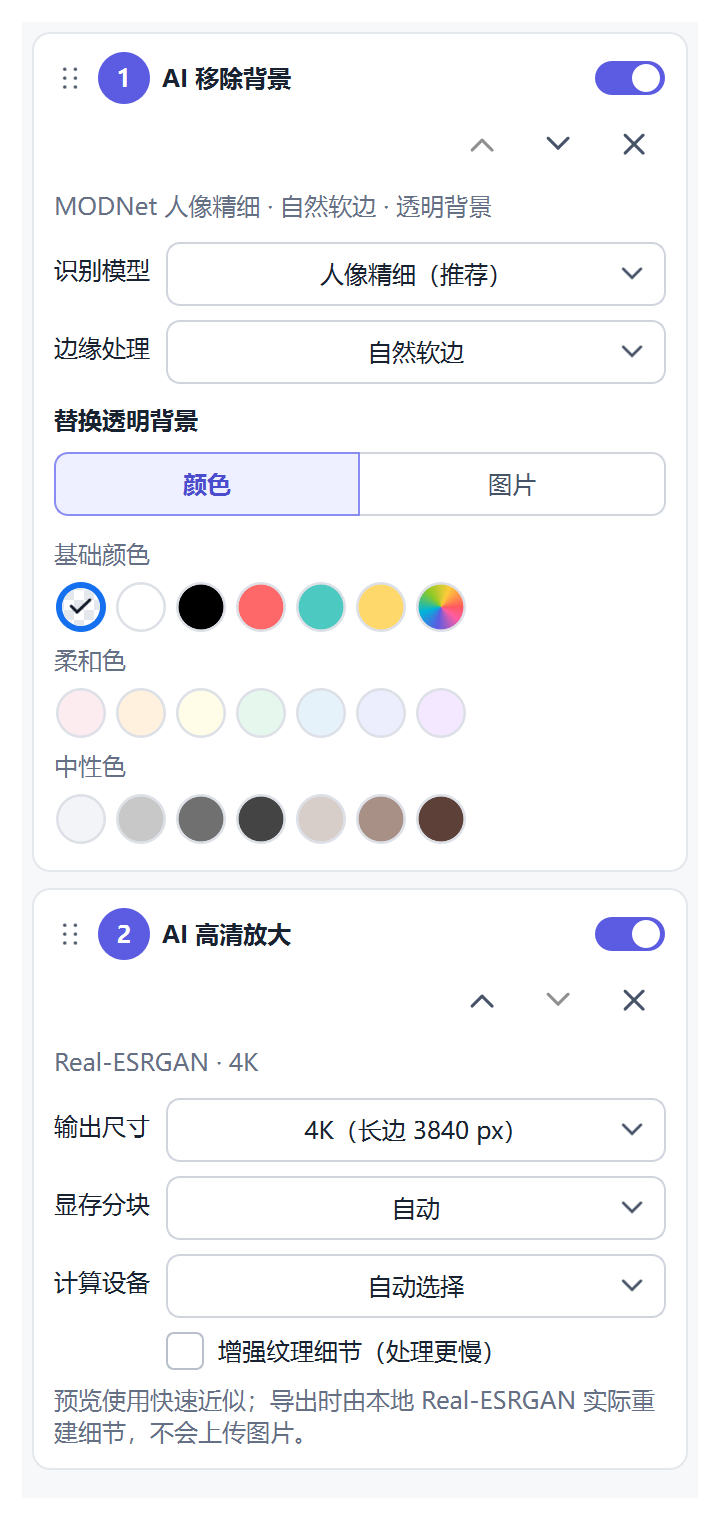
AI with an offline boundary
MODNet focuses on fine portrait masks such as hair and fingers. U²-Net provides a general fast mode. Backgrounds can stay transparent or be replaced with a color or local image. Real-ESRGAN exports true model-processed 2×, 4×, 4K, or 8K results.
Before installing
Core batch operations run on a standard Windows system. Real-ESRGAN requires a Vulkan-capable device; large 4K and 8K jobs need more memory and time.
The Windows x64 installer includes Qt/libvips dependencies, app-local Microsoft Visual C++ runtime DLLs, the AI worker, and local models. It is unsigned, so Windows may show a publisher or SmartScreen warning. Clean-machine installation has not been certified.
The desktop application has been built and tested on Windows 11 x64. macOS and Linux releases are not currently available.
Windows app questions
The current development release is available as a Windows x64 installer. No website account or subscription is required to use it.
The download button links to the configured Windows distribution channel. Check the current package and system requirements before installing.
No. Background removal and AI upscaling use local models and backends. Required dependencies and compatible hardware must be available on your Windows device.
No. The online editor handles batch resize, crop, watermarks, conversion, compression, and other pixel edits. Local AI background removal and Real-ESRGAN upscaling are desktop features.
Practical queue size depends on image dimensions, system memory, the selected steps, and output format. This page does not promise unlimited processing or a fixed performance benchmark.
The online studio offers ten operations, including lightweight AI background removal, without installing desktop software.